map2gazebo

1. The github source code has many points to be fixed,
update map2gazebo/src/map2gazebo.py by following:
http://mionzwp.bumbleplay.com/ros/03-ros-generate-world-from-scan-map/

2. Edit the map (crop/rotate/add walls/add unknown area)
convert map.pgm map.png
edit map.png using any photo edit tool (photopea.com)
convert map.png map.pgm

3. Edit map.yaml file to set the robot origin
first set origin: [0.0, 0.0, 0.0], the bottom left of the map will be set to center in the rviz.
One grid equal to 1 metre.
Run rosrun rviz rviz -d navigation.rviz to open rviz.
Run rosrun map_server map_server cmc7f_202504.yaml to load map.
Update yaml file, Assign x = -5.0 will move map to the left, y= -5.0 will move map down.
The center of 10×10 grid is the position where the robot spawn.
Save yaml file, and load the map again to update origin position in rviz
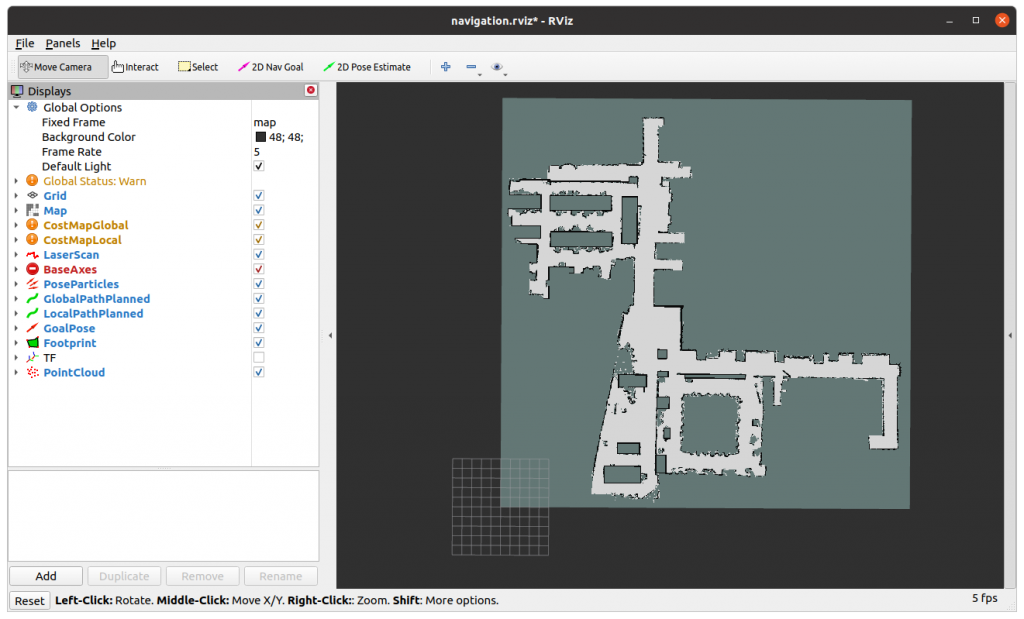
4. Run map_server to load map
rosrun map_server map_server cmc7f_202504.yaml
[ INFO] [1766297469.674219814]: Loading map from image “cmc7f_202504.pgm”
[ INFO] [1766297469.679488601]: Read a 850 X 850 map @ 0.050 m/cell

5. Run map2gazebo.launch to create a model from rosmap
roslaunch map2gazebo map2gazebo.launch params_file:=$(rospack find map2gazebo)/config/defaults.yaml
[INFO] [1766297467.412934]: map2gazebo running
[INFO] [1766297469.685248]: Received map
[INFO] [1766297481.411006]: Exported STL. You can shut down this node now

6. Run gazebo_world.launch, then File -> Save World As -> map_7f.world
roslaunch map2gazebo gazebo_world.launch
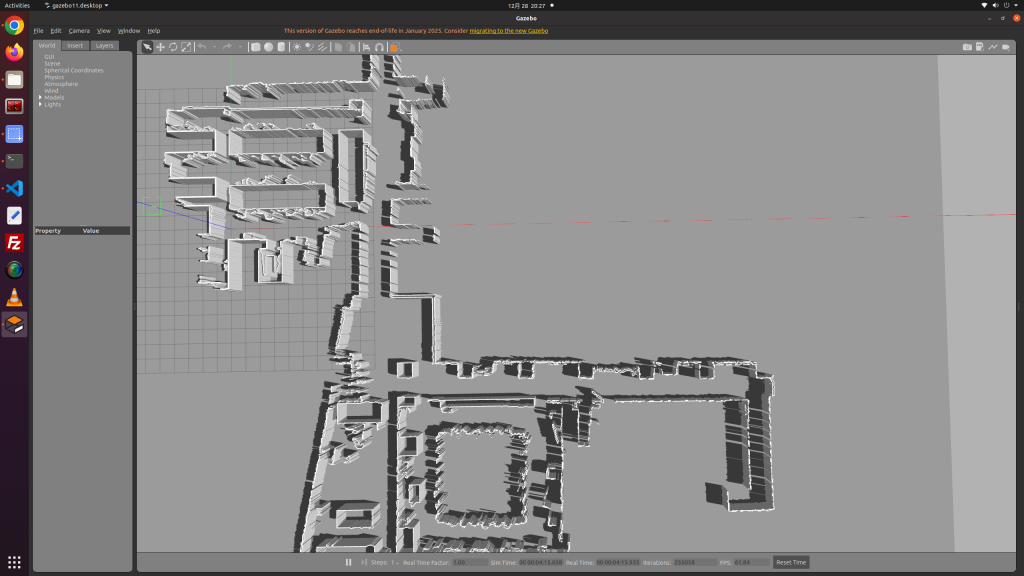
7. Copy .world file and folder ~/catkin_ws/src/map2gazebo/models to destination

8. Create a launch file that read load the model folder and .world file

Posted in ros

catkin_make vs catkin build

นั่งอ่านมาหลายรอบ จดโน๊ตไว้ทุกครั้ง แต่จดไว้ที่ไหนก็นึกไม่ออก มีทั้งสมุดทั้งเว็บทั้งโปรแกรม พอจะสร้าง packageใหม่ ก็งง ทำไงดี จำวิธีไม่ได้ ละก็ยังใช้ ros1อยู่ค่ะ…ไม่ได้ไปไหนสักที

ระบบ build/compile code ของ ros1 เอาไว้ใช้กับ .cpp ถ้าเป็นไฟล์ python มาก็เอาใส่โฟลเดอร์ ละเรียกใช้ได้เลย แต่ต้อ set permission chmod 777 ก่อน จำได้ว่า 775 ก็พอละ แต่เลขมันจำยาก.. ยก all permission ให้ไปเลย

catkin_make เป็น default build command ใน ros groovy (2012) และก็ยังใช้มาเรื่อยๆ เค้าบอกว่าข้อเสียของอันนี้คือ มันbuild โฟลเดอร์ src ทั้งก้อน เลือก build เฉพาะ package ไม่ได้ ซึ่งก็ไม่จริงเพราะใช้ คำสั่ง catkin_make –pkg <pkg_name> ได้

ตัว catkin_make เนี่ย จะไปหา package.xml ตามโฟลเดอร์แต่ละอัน แล้วทำ build dependency ขึ้นมา ซึ่งเราสามารถ install missing dependencies ได้จากคำสั่งข้างล่าง

rosdep update

rosdep -y install –from-paths src –ignore-src

ตอนสร้าง package ใหม่ ให้ใช้คำสั่ง
catkin_create_pkg <pkg_name> rospy std_msgs tf2_ros

cd ~/catkin_ws/src
catkin_create_pkg my_package actionlib geometry_msgs move_base_msgs nav_msgs rospy std_msgs tf2_ros

อย่างสร้างโฟลเดอร์เอง เพราะมันจะไม่มี package.xml กับ CMakeLists.txt
แต่พวก dependencies เนี่ยสิ ตอนแรกจะไปรู้มั้ยว่าจะใช้อะไร คงต้องมานั่งเขียนใส่ใน package.xml กับ CMakeLists.txt เองทีหลังสินะ…

catkin build ที่มาช่วยให้ build แยก package ได้ เป็นคำสั่งใน catkin_tools มาช่วง ros indigo (2014) และเป็นที่นิยม เห็นว่า build เร็วขึ้น มีฟีเจอร์อื่นๆให้ใช้ แต่ใช้ไม่เป็น

sudo apt-get install ros-noetic-catkin python3-catkin-tools

catkin build <pkg_name>

catkin build – build packages
catkin clean – clean build products
catkin config – configure workspace settings and layout
catkin create – create packages
catkin env – run commands with a modified environment
catkin init – initialise a workspace
catkin list – list package information
catkin locate – get workspace directory paths
catkin profile – manage named configuration profiles
catkin test – test packages

จำได้ว่าถ้าใช้ catkin build แล้ว จะกลับไปใช้ catkin_make ไม่ได้ละนะ..

Posted in ros